
Key Takeaways
- Define clear monitoring objectives aligned with business goals.
- Utilize AWS-native tools alongside third-party solutions for comprehensive monitoring.
- Implement automated alerting and incident response mechanisms.
- Regularly review and optimize monitoring configurations to adapt to evolving needs.
Introduction
Ensuring the reliability and performance of your AWS infrastructure is crucial to sustained business success. Organizations need robust, proactive monitoring to identify issues quickly, optimize usage, and safeguard resources. Leveraging comprehensive solutions, such as eG Innovations, empowers teams to take AWS monitoring to the next level. Combining AWS-native monitoring with advanced analytics and automation can build unwavering confidence in cloud performance and security.
This detailed guide covers key strategies, tool recommendations, and integration tips, helping you develop a monitoring framework that aligns with technical and business objectives.
Establish Clear Monitoring Objectives
Success with AWS monitoring starts by defining measurable objectives. Carefully assess your environment to pinpoint the most impactful performance indicators. Metrics like CPU utilization, memory consumption, disk I/O, and network latency provide foundational visibility. However, objectives should go beyond technical needs; tie monitoring goals to business outcomes. For example, online retailers might focus on checkout latency, while SaaS platforms prioritize service uptime. With defined KPIs, teams can proactively manage performance and respond quickly to emerging issues, minimizing risk to end-user experience and service availability.
Select Appropriate Monitoring Tools
Amazon provides a suite of native services to address core monitoring requirements:
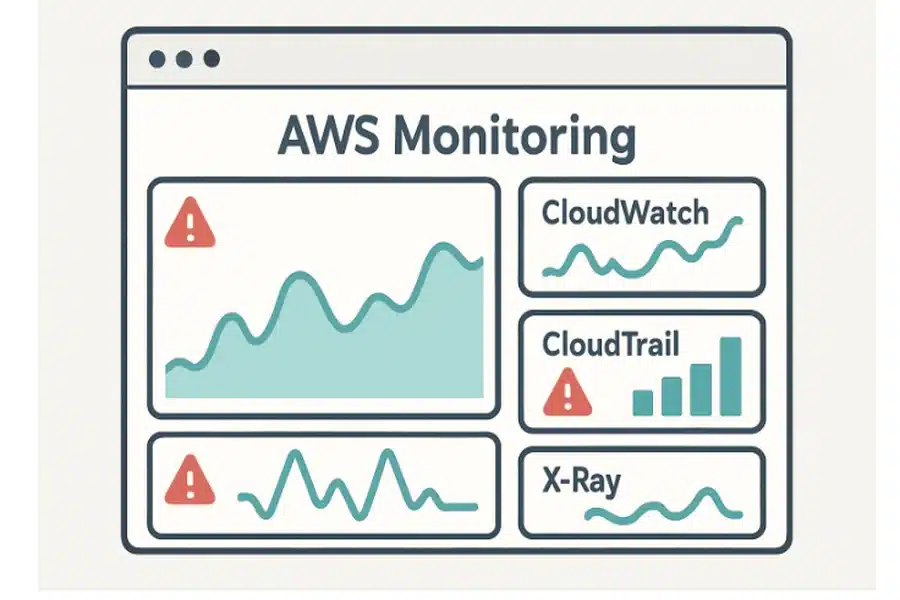
- Amazon CloudWatch – Enables real-time tracking of operational metrics, collection of logs, and customizable dashboards and alarms.
- AWS CloudTrail – Records all API activity in your AWS account, offering deep visibility into access changes, audits, and compliance.
- AWS X-Ray – Specializes in distributed tracing for applications using microservices or serverless frameworks, simplifying performance bottleneck identification.
For advanced workloads, third-party tools offer in-depth analytics, cross-cloud integrations, and enhanced visualization. Solutions like Datadog, New Relic, and Dynatrace enrich monitoring with AI-powered insights and support for hybrid or multi-cloud architectures. Integrating these tools alongside AWS-native services creates a unified monitoring stack that delivers both breadth and depth of visibility.
Implement Automated Alerting and Incident Response
Automated alerting is vital to ensuring problems are caught and addressed immediately. Set alert thresholds tailored to your infrastructure’s normal operating ranges to avoid alert fatigue or missed incidents. Configure notification options using services like AWS Simple Notification Service (SNS), which can distribute alerts via email, SMS, or external systems. Establish clear escalation paths so critical incidents are routed to appropriate personnel or teams.
Automate remediation processes wherever possible using AWS Lambda or integration with ITSM platforms for production environments. For example, automatically restart an unhealthy EC2 instance or scale out services when thresholds are breached. Automation dramatically reduces response times, contains impact, and increases overall system resilience.
Regularly Review and Optimize Monitoring Configurations
The dynamic nature of cloud infrastructure demands ongoing optimization of your monitoring configuration. As your environment evolves—whether through new application deployments, scaling events, or the adoption of additional AWS services—your monitoring must adapt. Schedule regular reviews of metric dashboards, adjust alarm thresholds based on historical trends, and expand coverage as business priorities shift. Incorporate feedback from recent incidents to refine alerting effectiveness, eliminate noise, and maintain accuracy in detection.
Leverage AWS Cost Explorer or Billing Dashboard to ensure your monitoring footprint is cost-effective and provides maximum value for your investment. Continually adjusting your configuration ensures detection capabilities evolve in step with your operational landscape.
Ensure Compliance and Security
Security and compliance are integral components of a well-architected monitoring strategy. AWS Config enables visibility into resource configurations and continuous compliance checks, while AWS Security Hub aggregates and prioritizes security findings across AWS accounts. Regularly auditing your environment for compliance with standards—such as CIS Benchmarks, HIPAA, or GDPR—is vital in regulated industries. Combining security monitoring with infrastructure observability strengthens your ability to detect and respond to threats before they impact users or compromise data integrity.
For more information about secure AWS resource configuration, consult the AWS Config Documentation.
Leverage Machine Learning for Anomaly Detection
With the complexity of modern cloud environments, static alert thresholds can miss subtle but significant anomalies. AWS CloudWatch Anomaly Detection applies machine learning algorithms to historical metric data, identifying deviations that may signal performance or security issues. Pairing this with predictive scaling policies—using tools like AWS Auto Scaling—enables proactive resource adjustments, preventing outages and cost overruns.
Automated insights from AWS Trusted Advisor and AWS Compute Optimizer help continuously optimize resource allocation and cost, surfacing recommendations that align infrastructure with best practices and evolving usage patterns.
Integrate with DevOps Practices
Effective monitoring must be tightly integrated with your software delivery pipelines and version-controlled infrastructure. Incorporate a monitoring setup into your CI/CD workflows to monitor each new deployment from day one. Infrastructure as Code (IaC) tools like AWS CloudFormation or Terraform make it easy to codify monitoring dashboards, alarms, and IAM roles, enabling repeatable and auditable setups across development, staging, and production environments.
Establish feedback loops where monitoring insights inform development priorities, operational improvements, and root cause analyses. Frequent reviews between DevOps and infrastructure teams ensure monitoring configurations are always aligned with application features and business needs.
Adopting a holistic and adaptive approach to AWS monitoring—inclusive of business-aligned objectives, advanced tools, automated incident response, and security best practices—builds the foundation for a resilient, high-confidence cloud environment capable of supporting continuous growth and innovation.


