
A kinetic typography generator is worth buying when you already have approved campaign copy and need moving type that stays readable, timed, factually exact, and cheap to revise. It is not worth buying because it offers the longest effects menu.
TapVid turns materials you already have into a video that can explain a product, offer, or instruction. For kinetic type, the approved line should control the brief. The generator can move the words. The campaign owner still owns wording, claims, legal review, and the final cut.
Start with the job the approved line has to do
Campaign type is easy to decorate and easy to get wrong. A slogan, a price, a product name, and a legal clause are not the same job. If you start by browsing presets, the tool will optimize for motion first. The buyer then spends the revision cycle putting the facts back in.
Write one acceptance sentence before you open any generator:
For this placement, the video will show this approved line, in this reading order, at this size, with this offer still exact after one wording change.
That sentence forces useful choices. A 9:16 hook that only needs a five-word opener is a different purchase from a 16:9 product cut that must keep a SKU, a price, and a dated offer on screen. A training clip that must keep an instruction verbatim is a different purchase from a lyric-style social clip where the words can be split for rhythm.
Name four fields before you score a tool:
- Line: the exact approved wording, including units, trademarks, and any required disclaimer.
- Job: stop a scroll, explain a claim, title a scene, or caption a presenter.
- Frame: 16:9, 1:1, or 9:16, plus the smallest size a reviewer will actually watch.
- Change: the next likely edit, such as a price, a date, a SKU, or a CTA.
If those four fields are blank, you are not choosing a kinetic typography generator. You are shopping for motion. Motion can still be useful. It is not the same as a campaign delivery tool.
Build one trial pack from a real campaign line
Do not trial a generator with “SALE NOW” or a quote you do not have to defend. Use a line that would be embarrassing if it came out wrong. A useful pack has three versions of the same message:
- A short hook, about 4 to 7 words.
- A mid claim that includes one product name or one figure.
- A long offer or legal line that legal or finance would reject if a word moved.
Keep the source next to the output. If the team already has a screenshot, a product still, a landing-page crop, or a talking-head take, include that file. Kinetic type that looks clean on a black slate can still fail when it has to sit beside the asset the claim is about.
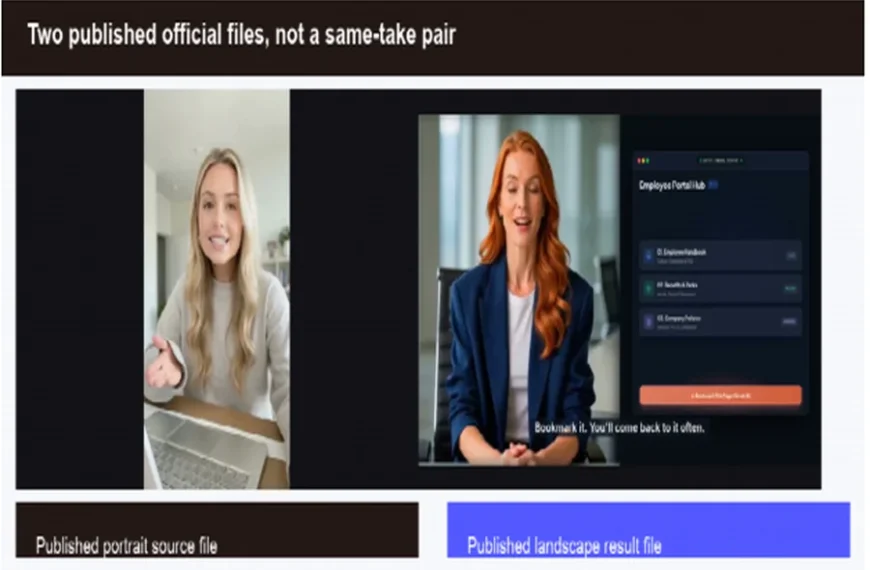
The public kinetic page publishes two labeled files. They are a documented TapVid test asset, not a hands-on campaign run by this article. The files are a talking-head source poster and a result frame with timed kinetic captions. One inspected result frame shows the on-screen line “Bookmark it. You’ll come back to it often.” next to a presenter and a product-style interface. The files prove a public example exists. They are not a same-take pair. The source file is a 9:16 blonde talking-head poster. The result file is a 16:9 frame with a different presenter, a different crop, and a product UI. The official page calls this one specific transformation and also says “the same footage.” The inspected files do not support same presenter or same take. Use the files as a production reminder, not as a score for your offer.
Figure: Two published official files, not a same-take pair. The page labels a source file and a kinetic-caption result. This article inspected those files. It did not run a new first-hand campaign test.
Use the trial pack the same way for every vendor. Paste the exact mid claim first. Then ask for the reading order in plain language: which phrase leads, where the pause lands, and what the viewer should notice first. Export or preview at the smallest target size. Only then change one word in the long line and see what else moves.
If a vendor cannot take your approved wording as the starting point, stop. A prompt-only effects toy can still be fun. It is the wrong purchase when legal already signed the sentence.
Score a kinetic typography generator on four checks
Rank tools with one scorecard, not a feature grid. Score the same approved line on four checks. Leave every number blank until you have a real run. A blank cell is more honest than a guessed 4 out of 5.
Check: Legibility
- What you inspect: Smallest target size, contrast, and how long the words stay still
- Pass signal: A stranger can read names and numbers after the motion settles
- Fail signal: Thin type, stacked motion, or crop at the safe edge
- Score:
Check: Timing
- What you inspect: Reading order, pause, and whether you can direct emphasis
- Pass signal: The lead phrase arrives first and the pause is controllable
- Fail signal: The tool stresses a filler word or rushes the claim
- Score:
Check: Factual fidelity
- What you inspect: Names, figures, prices, units, and required legal words
- Pass signal: The on-screen string matches the approved source, character for character
- Fail signal: Rewrite, synonym, dropped unit, or a changed CTA
- Score:
Check: Revision effort
- What you inspect: What happens when one approved word changes
- Pass signal: One line or scene can change without a full rebuild
- Fail signal: Every edit resets timing, fonts, or the rest of the cut
- Score:
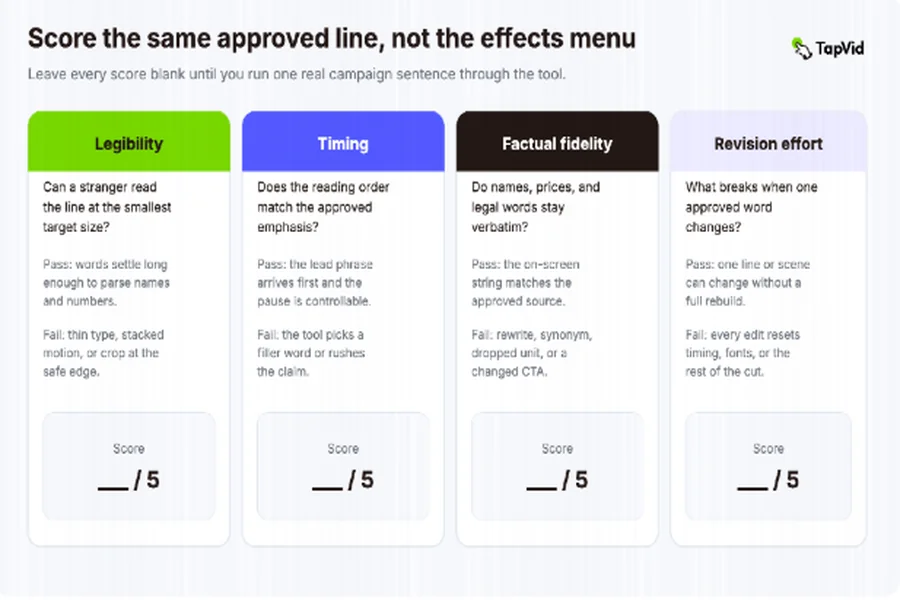
Figure: Score the same approved line on legibility, timing, factual fidelity, and revision effort. Do not fill the scores until you have a real run.
The blank card is the worksheet. The comparison below is a labeled hypothetical fill-in so you can see how a decision looks before you spend a trial. It uses the same invented line as the timing example: “Save 18% on Model K2 through Friday.” These numbers are teaching scores. They are not results from this article’s run, and they are not vendor ratings.
Check: Legibility
- Preset editor (hypothetical): 4. The short hook is readable at 9:16. The long line wraps into the safe edge on 16:9.
- Overlay or field edit (hypothetical): 4. The caption sits in a clean lower third at phone size.
Check: Timing
- Preset editor (hypothetical): 2. “Save” bounces first. 18% and Model K2 arrive late.
- Overlay or field edit (hypothetical): 3. You can delay the line, but the tool still treats “Save” as the hook.
Check: Fidelity
- Preset editor (hypothetical): 2. The export reads “Save 20% on Model K2 this week.”
- Overlay or field edit (hypothetical): 5. The on-screen string matches character for character.
Check: Revision
- Preset editor (hypothetical): 2. Changing Friday rebuilds the preset and the typeface.
- Overlay or field edit (hypothetical): 4. You change Friday to Monday in a field. The motion stays.
Read the comparison as a stop rule, not a winner board. Fidelity 2 on the preset path is enough to reject that class for a priced claim, even if the motion looks expensive. If your live test disagrees, keep your numbers and throw these away.
Legibility
IK Agency’s 2026 kinetic typography guide gives a useful floor: text should stay readable for at least half a second after it settles. Treat that as a starting check, not a campaign guarantee. Your reviewer may need longer when the line contains a SKU, a decimal, or a brand spelling that is easy to misread.
Watch the smallest output, not the desktop preview. A 9:16 crop that looks bold on a 27-inch monitor can lose the last word on a phone. Check safe edges, line breaks, and whether a drop shadow is doing work the contrast should have done. If the generator uses thin script or decorative faces by default, reject that preset for any line that carries a fact.
Timing
Colossyan’s 2026 text-animation comparison makes a structural point that still holds when you ignore its vendor ranking: a useful kinetic cut often has a hook, an emphasized line, the main message one line at a time, and a still ending. The structure is on you. The tool only supplies motion.
Your score should ask a narrower question. Can you make the approved emphasis win? If the signed line is “Save 18% on Model K2 through Friday,” the number and the model have to lead. A generator that animates “Save” with a bounce and whispers the rest has failed the timing check, even if the motion looks expensive.
iArt’s public kinetic page argues that a prompt can replace keyframes and that a copy change need not break motion. Videohead’s public overlay page says small copy and timing tweaks can happen after generation without a full regenerate. Those are vendor claims. They belong in your trial notes as hypotheses. They do not fill the score cell.
Factual fidelity
This is the check most effects roundups skip. Campaign copy is not a mood. Product names, prices, dates, and legal phrases have to survive the generator.
TapVid’s public kinetic typography page states that supplied product names, figures, prices, and approved claims stay verbatim instead of being rewritten. That is a documented product claim, not a result from this article’s own campaign run. Your trial still has to prove it with your line. Compare the export to the source character for character. Watch for silent “improvements”: a rounded number, a missing trademark mark, a swapped unit, or a CTA the model thought sounded stronger.
If the tool can rewrite, it must also be able to lock. A locked field you cannot see is not a lock.
Revision effort
The fourth check decides whether the tool is cheaper than a freelancer or only cheaper on the first export. Change one word in the long line. Record what else moved.
Four common revision paths show up in current tools:
- Preset rebuild: you reopen a template and retype the line. Cheap on day one, expensive when the campaign iterates.
- Prompt regenerate: you describe the change and wait for a new clip. Fast when the new clip is close. Costly when each regenerate also changes timing you already approved.
- Field-level edit: you change the text field and the motion stays. This is the path overlay tools advertise.
- Scene rerun: you revise one scene and leave the rest in place. TapVid’s public page describes this as a targeted rerun after scene-level review.
Score the path you actually used. Do not score the path the marketing page prefers.
Check the same line across lengths and frames
A generator that wins on one 16:9 slate can still fail the campaign. Paid placements, organic posts, and landing-page embeds rarely share one crop. Run the same approved line through three frames and three lengths. Leave the cells blank until each export exists.
Line: Short hook, 4 to 7 words
- 16:9:
- 1:1:
- 9:16:
Line: Mid claim with one name or figure
- 16:9:
- 1:1:
- 9:16:
Line: Long legal or dated offer line
- 16:9:
- 1:1:
- 9:16:
In every cell, record three facts only:
- Can the line be read at the smallest size?
- Did any word, number, or unit change?
- How much work did a one-word edit take?
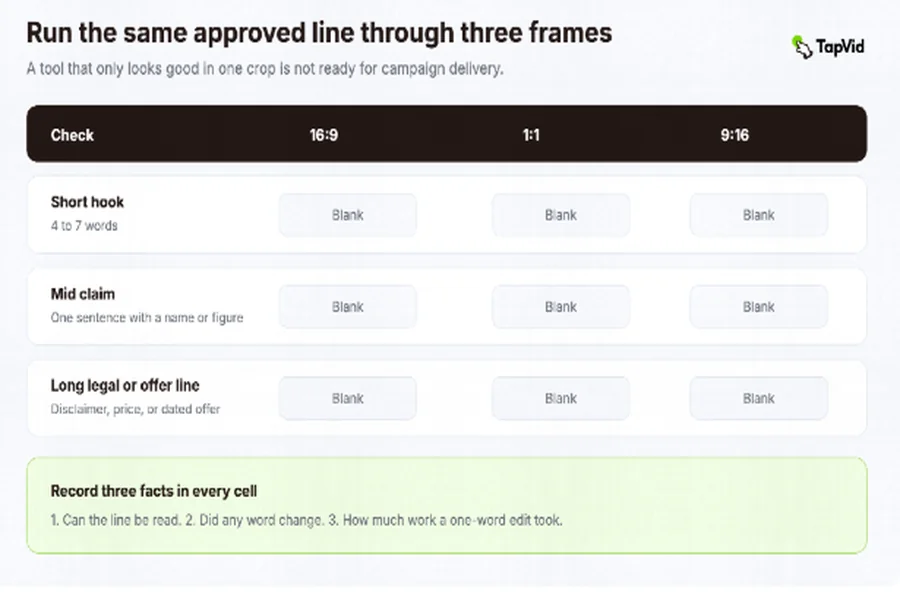
Figure: The same approved line should be checked in 16:9, 1:1, and 9:16. Result cells stay blank until each export exists.
This grid is the information the effects list will not give you. A lyric-style tool may ace the short hook in 9:16 and break the long offer in 16:9. A timeline editor may keep every word exact and still cost too much when Friday’s price changes. A scene-based generator may keep the long line exact in 16:9 and then reflow it badly when you switch to 9:16.
Do not average the cells into one winner. If your live media plan uses two frames, the tool has to pass both. If legal owns the long line, a pretty short hook cannot rescue a failed disclaimer.
CapCut’s public kinetic-typography article tells buyers to look for templates, layering, languages, and export formats. Those are real procurement fields. They are secondary here. A clean export of the wrong sentence is still the wrong sentence.
Compare revision paths, then pick a delivery class
Price pages and template counts do not tell you the second-week cost. After the first preview, force one boring edit: change the date, the percentage, or the model name. Then ask the vendor, or watch the product, which of these is true:
- The rest of the cut stays put.
- You can review the scene before you spend the next render.
- A failed or rejected take is easy to isolate.
- Someone who did not design the first version can make the edit.
Name the offer you are actually using before you treat a homepage “start free” line as a buying test:
- A preview that plays in the browser but will not export.
- Credits that expire at the end of a billing cycle.
- A paid one-video pass or a 24-hour pass.
- A monthly subscription that may not roll unused credits.
Those are different tests. A preview that cannot leave the site does not prove delivery. Credits that expire do not prove next month’s revision cost. TapVid’s public pricing page lists a paid one-video pass that lasts 24 hours, plus monthly credit plans. It does not list a seven-day free trial. Check the current offer on the vendor you are about to try.
Use the revision test to reject two false bargains.
The first is the all-purpose effects suite. If the tool can do 3D, glitch, comic bursts, and lyric modes, but cannot lock a SKU, you are paying for a showreel. Campaign owners do not need a showreel. They need a line that can survive Friday’s update.
The second is the one-click prompt. If every regenerate also changes the pause, the typeface, or the crop, you do not have a revision path. You have a slot machine. Slot machines are acceptable for mood boards. They are a poor fit for approved copy.
If your team already has After Effects or a motion designer on retainer, the generator only has to beat the cost of the next change, not the cost of the first beautiful version. If your team does not have that retainer, revision effort is the whole product.
After the scorecard and the frame grid, pick a delivery class. Do not pick a brand from a listicle.
Choose a preset editor when the job is a short social hook, the wording can flex, and one person can rebuild the template when the line changes. This is the CapCut, Canva, and template-pack lane. It is honest when the campaign is disposable.
Choose a prompt-to-motion generator when you need many visual directions fast and the words are short enough that a missed synonym is not a legal event. Keep it out of priced claims until the fidelity check passes. iArt’s public page sits in this lane: a prompt replaces keyframes, and a copy change is supposed to keep the motion.
Choose an overlay or caption tool when you already have footage and only need timed type on top. Videohead’s public page is built for that job: generate an overlay, then tune copy and timing. Kapwing sits in a similar lane in Colossyan’s comparison. The footage is the source of truth. The type has to respect it.
Choose a scene-based production system when the approved line has to stay exact, sit next to the right asset, and change without a full rebuild. That is the buyer job this article is for. Among the kinetic-typography pages inspected for this keyword on 6 September 2026, TapVid’s public kinetic page is the named public example that documents those four controls together: verbatim supplied copy, plain-language direction, scene-level review, and a targeted rerun of one scene. That is a documentation observation. It is not a score from this article, and it does not mean no other product can do the job. Colossyan’s comparison treats Animaker as prompt-to-scene and Kapwing as captions on existing footage. Those are adjacent jobs. They are not the same class. If a vendor in this class will not let you paste the signed sentence first, treat it as prompt-to-motion until your fidelity check says otherwise.
Choose a manual timeline when the motion itself is the deliverable: a title sequence, a brand film, or a frame-perfect design system. After Effects remains the reference in IK Agency’s guide for that work. It is the wrong default when the scarce resource is campaign-owner time, not animator time.
The next step is one tool in the class you actually need, on the offer you actually have. Take the trial pack. Fill the four scores. Fill the nine frame cells. If a cell stays blank, the tool is not ready for that placement. If factual fidelity fails, stop even if the motion looks expensive. Approved copy is the product. Kinetic type is only the delivery.
Frequently Asked Questions
When is a kinetic typography generator the wrong purchase?
When you do not have approved wording yet, when the words can flex for rhythm, or when the motion itself is the deliverable. In those cases a preset pack, a prompt toy, or After Effects is the more honest first trial. A generator is the wrong purchase for priced claims if it cannot lock a name, a figure, or a date.
How should I test a kinetic typography generator before I pay?
Use one real approved line in three lengths and three frames. Score legibility, timing, factual fidelity, and revision effort. Leave scores blank until those exports exist. Do not test with a slogan you would never run. Also name the offer: preview, expiring credits, a paid short pass, or a subscription. A 24-hour one-video pass is not a seven-day free trial.
Can I judge a kinetic typography generator by its effects library?
No. Effects tell you what the tool can decorate. They do not tell you whether Friday’s price change will force a rebuild, or whether a product name will survive the first generate.
Will an AI kinetic typography generator keep my wording exact?
Only if the product can lock supplied copy and you check the export against the source. Some vendors, including TapVid’s public kinetic page, say approved names, figures, prices, and claims stay verbatim. Other vendors describe prompt-led motion that can also change type and timing. Your trial has to prove the behavior you need.
What if I already have talking-head footage?
Then the question is whether the generator can add timed type around a real presenter without becoming a new talking-head production project. The official files above are two published assets, not proof that every clip keeps the same presenter. That is still a caption-and-type job. It is not a reason to reopen lighting, performance, or a full talking-head rebuild.
Do I need After Effects for campaign kinetic type?
Only when the motion itself is the deliverable and you have the time to keyframe the next edit. For approved campaign copy, a scene-based or field-level editor is usually the better first trial. After Effects can still win a brand-film brief.
What should I do with a blank scorecard?
Keep it blank until your exports exist. Use the hypothetical table only as a pattern for how to decide. Filling your live card from a homepage demo, a remembered trial, or a vendor comparison is how effects roundups get written. It is not how you choose a tool for approved copy.


