
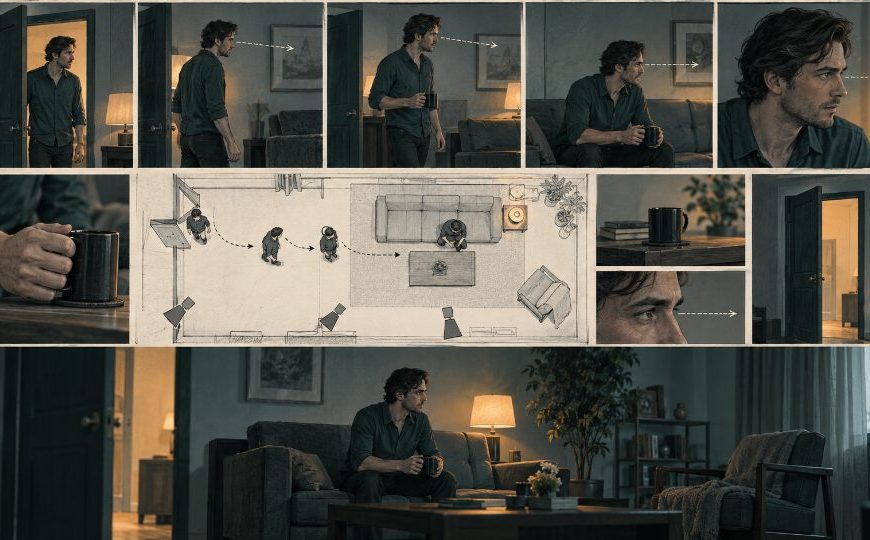
A storyboard can look polished and still send a crew in the wrong direction. One frame puts the actor on camera left, the next moves the door, and a later close-up reverses the hand holding a prop. Each image works alone. Together they describe a scene that cannot be cut without a visible jump.
An AI image tool is useful here when it helps clean and compare storyboard stills without quietly redesigning the set. The review target is not beauty. It is screen geography: who stands where, which way a person looks, where the exit sits, and what must remain consistent when the shot size changes.
PicEditor AI accepts common JPEG, PNG, and WEBP files up to 30 MB and offers focused editing routes such as object cleanup, background change, enhancement, and image-to-image work. For previsualization, those routes matter only after the team fixes the spatial facts of the scene.
Draw The Scene Geography Before Editing Stills
Start with a top-down sketch. Mark the camera, actors, door, window, major prop, and the imaginary line connecting the characters. The drawing can be rough. Its job is to make direction explicit before individual frames start suggesting conflicting layouts.
Give Every Fixed Object One Screen Side
Write simple rules beside the sketch: door stays frame right, lamp remains behind the seated actor, blue folder enters from the window side. These notes protect the location from being reinterpreted as the angle changes. They also give the reviewer a short list of details that must survive a cleanup request in an AI Photo Editor.
Record Gaze And Travel Direction Separately
An actor can stand on the correct side and still look the wrong way. Note whether each person faces left or right, then note how movement enters and leaves the frame. If a character exits right in a wide shot and arrives from the right in the next frame, the cut implies a reversal unless the script deliberately crosses the line.
| Continuity fact | Frame check | Reject when |
| Door position | Same side in every wide view | Door moves behind the other actor |
| Gaze | Eyelines meet across the cut | Both actors look the same way |
| Prop hand | Folder stays in the right hand | Grip swaps during the close-up |
| Travel | Exit and entry directions agree | Motion doubles back accidentally |
The map gives every department the same continuity reference. It also shows which differences are intentional. A close-up can change background detail, but it cannot move the door if the next action depends on that doorway.
Follow Three Steps From Reference To Final Board
Choose the clearest wide still as the spatial source. Duplicate it before changing crop, lighting, or surface clutter. A Photo editor can help remove a distracting stand or create a cleaner plate, but every derivative should remain traceable to that approved layout.
Change Shot Size Without Moving The Room
Create the medium and close views by protecting the actor’s screen side and the direction of background lines. A tighter crop may hide the window; it should not place the visible door on the opposite edge. When PicEditor AI produces a candidate, compare it with the wide still before discussing color or atmosphere.
Keep Props Attached To The Same Action
Mark the prop’s owner, hand, orientation, and state. An open notebook cannot become closed simply because the angle changed. If the story needs that change, add a beat that shows it. The AI Photo Editor should support the planned action, not create an invisible action between boards.
Separate Lighting Exploration From Layout Approval
Once geometry passes, make lighting variants from the same accepted frame. Name them by the light decision—window soft, practical warm, corridor cold—instead of treating them as new versions of the room. This prevents a preferred grade from sneaking in a different chair, doorway, or actor position.
A working storyboard file should make the chain obvious: base layout, crop variant, lighting variant, final board. Do not mix unrelated generations into one folder and ask the next department to infer which spatial details matter.
Number versions by shot and decision, such as 12A-base, 12A-crop, and 12A-window-light. That small convention makes feedback precise. A director can approve the crop while rejecting the light without sending the artist back to an unrelated generation. It also keeps a late visual preference from replacing the spatially correct source.
When a frame needs a larger repair, return to the wide reference rather than patching the latest derivative. Repeated edits can compound small shifts in doors, shoulders, and prop edges. Starting from the accepted geography gives each variation the same foundation and makes differences easier to audit.
Audit The Contact Sheet Before Animating Anything
Place every board on one page in story order. View it first as small thumbnails. Large previews invite attention to faces and textures; thumbnails make flips in composition and travel direction easier to spot. Draw a horizontal line through repeated eye levels and a vertical guide through fixed door or window edges.
Run The Left Right Read Without Dialogue
Hide captions and describe the movement aloud: she looks right, he answers left, she crosses toward the door, he remains by the lamp. If that narration becomes impossible, the boards are relying on text to repair visual geography. Correct the offending still before anyone turns it into motion.
Use A Flip Test For Near Matching Frames
Alternate rapidly between two connected boards. Watch the door edge, shoulder line, prop silhouette, and negative space around the actors. A small jump becomes obvious when the images flip. The mismatch appears before anyone starts debating which frame looks more cinematic.
PicEditor AI can improve the selected still once the sequence passes. Enhancement should come last because sharpened detail makes a continuity error look more finished, not more correct. Keep the source contact sheet beside the cleaned version so late revisions can be checked against the same geography.
Invite someone outside the image team to read the boards once. A production coordinator or assistant director will often notice that an entrance cannot be staged, a prop changes hands, or an eyeline points off set. Their practical reading is valuable because the boards are ultimately instructions for people, space, and time—not standalone illustrations.
Hand The Crew A Board They Can Stage
A useful storyboard is a set of spatial instructions, not a gallery of disconnected images. It should tell the camera and art departments where objects sit, which direction actors travel, and what the audience must understand at each cut.
Archive the final contact sheet with the geography sketch. If a shot changes during rehearsal, the team can see which neighboring boards must also change instead of repairing continuity one frame at a time.
Lock the wide reference, protect screen direction, and inspect the sequence at thumbnail size. That discipline lets an AI Photo Editor help with presentation while the crew receives a plan that can actually be staged, filmed, and cut without inventing geography on set. The Photo editor remains a finishing aid, not the author of the room layout.


