
Many people ask if it’s possible to download rented movies from Amazon Prime. The good news is that it is! However, there are certain limitations. In this guide, we’ll show you two simple methods to download rented movies from Amazon: one using the official Prime Video app and a third-party Amazon Video Downloader. Whether you’re traveling or dealing with a poor internet connection, these techniques will allow you to enjoy your movies whenever you want.
Can you Download and Watch a Rented Amazon Movie Offline?
Yes, you can download and watch a rented movie from Amazon offline, but only under certain conditions. Amazon Prime allows customers to download rented movies through the official Prime Video app on supported devices such as smartphones, tablets, and Fire tablets. However, there are some restrictions:
- Time Limits: After renting a movie on Amazon Prime, you have 30 days to start watching it and 48 hours to finish once you begin.
- Device Restrictions: Downloaded rented movies are only accessible via the Prime Video app, and you can download a rented movie on just one device.
- No Permanent Access: Once the rental period ends, the movie is automatically removed from your library.
With that clarified, let’s explore two methods to download rented movies on Amazon Prime.
Method 1. Amazon Download Rented Movie via Prime Video App
The most straightforward way to save a rented Amazon movie for offline viewing is by using the Prime Video app. Once you rent the movie, you can download it and watch it within the rental window (usually 30 days, and 48 hours after you start watching). The download will only be available inside the Prime Video app. Here are the steps you can follow:
Step 1. Download and launch Amazon Prime app on your computer. Search for the movie you want to rent and download, and choose “Rent HD.”
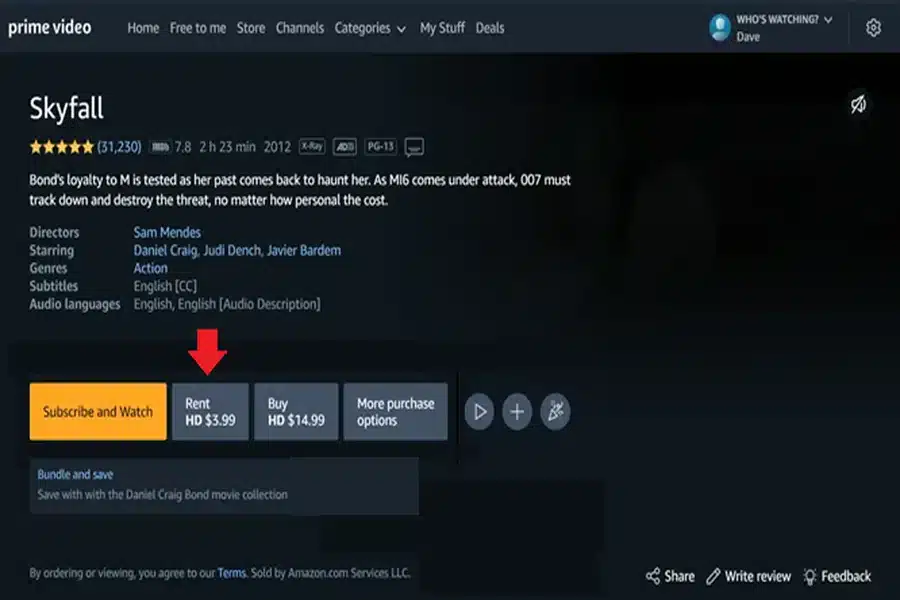
Step 2. Complete the rental process. Once the movie has been rented, go to “My Stuff > Purchases & Rentals” to view the rented movie.

Step 3. Select the rented movie title, and click on the “Download” icon to download the rented movie.
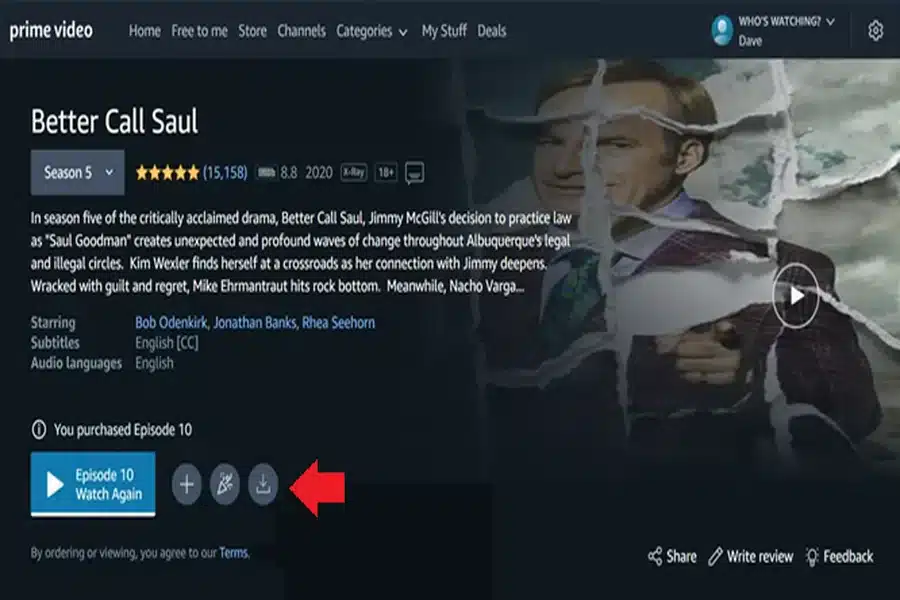
Step 4. Once downloaded, the rented movie will be available in the “Downloaded” section on Amazon Prime.
Method 2. Download Rented Movies from Amazon Easily
To download Amazon rented movies and have them on hand permanently, we suggest using Amazon Video Downloader. This tool helps download rented Amazon Prime videos without expiration dates. Compatible with Windows and Mac, Amazon Video Downloader supports downloading Amazon rented movies in MP4 format on your computer. Then, you can transfer downloaded Amazon movies to any advice and keep them forever. With Amazon Video Downloader, you don’t have to endure any Amazon download constraints and can simply download videos to your PC in HD quality.
How to download Amazon Rented Movie by Amazon Video Downloader:
Step 1. Download and install Amazon Video Downloader on your PC. Sign in to your account, and go to “Purchases & Rentals”.
Step 2. Select Amazon rented movie you want to download, and click on the download button.
Step 3. Once the download is complete, you can keep Amazon rented movies permanently.
Conclusion
This article covers two efficient ways to download rented movies from Amazon. Using the Amazon Prime app to download may be your initial option, but rented movies will be removed from your downloads once the rental period ends. If you wish to keep the movies permanently, Amazon Video Downloader is a better alternative. It allows you to download rented Amazon movies in HD quality for free, without any regional or time limitations. Download Amazon Video Downloader today and enjoy your movies anytime, anywhere!


