
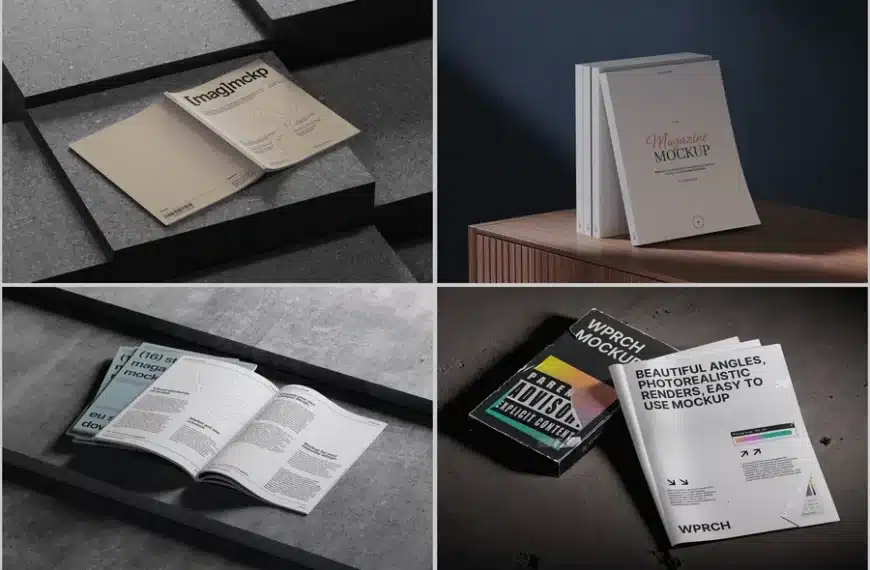
Designing a magazine cover or layout can be intimidating for beginners. The process of visualizing your ideas, testing layouts, and presenting polished designs often feels overwhelming. This is where magazine mockup come into play, transforming abstract concepts into realistic visuals that impress clients and stakeholders. By learning a few essential hacks, beginner designers can save time, elevate their work, and create professional presentations without expensive resources.
Why Magazine Mockups Are Essential
Mockups bridge the gap between your creative ideas and the final product. Instead of imagining how a magazine will look off the page, a mockup allows you to see your design in a tangible context. For beginners, this is crucial: it helps spot errors, refine typography, and experiment with imagery without committing to print.
Some key benefits include:
- Immediate visual feedback: Quickly see how colors, fonts, and layouts work together.
- Professional presentations: Impress clients by showcasing your design realistically.
- Time-saving experimentation: Test multiple concepts without wasting resources.
For example, if you’re designing a fashion magazine, placing your cover art onto a realistic mockup can instantly reveal whether the image pops or the text needs adjustment. Similarly, lifestyle magazines benefit from seeing spreads in context, highlighting flow and readability.
High-Quality Mockups on ls.graphics
One resource that beginner designers often overlook is ls.graphics. Their website offers a wide variety of magazine mockups that are not only visually stunning but also extremely user-friendly. Whether you need a single cover mockup or a multi-page spread, ls.graphics provides files that are easy to edit in Photoshop or other graphic software.
Key advantages of using ls.graphics magazine mockups:
- High resolution: Ensures crisp images for both digital and print presentations.
- Layered PSD files: Makes customization fast and intuitive.
- Versatile scenes: From elegant desktop setups to cozy coffee table shots, the mockups cater to different magazine styles.
- Realistic textures: Shadows, lighting, and reflections enhance authenticity.
For instance, a beginner designer creating a travel magazine layout can select a mockup featuring a stylish desktop setup. Dragging in the cover design instantly showcases the magazine in a realistic, professional environment. This not only impresses clients but also builds confidence in the design choices made.
Hacks for Beginners Using Magazine Mockups
Even with high-quality mockups, knowing a few tricks can improve your workflow dramatically. Here are practical hacks for beginners:
- Use smart objects effectively: Place your design in smart object layers so it automatically adapts to perspective and lighting.
- Experiment with backgrounds: Swap backgrounds in mockups to see which environment complements your design.
- Scale strategically: Adjust size carefully—oversized elements can look unnatural, while undersized ones may seem lost in context.
- Test multiple versions: Create several mockups of the same design to compare layouts or color palettes before client presentation.
Real-Life Examples
A beginner fashion designer used a magazine mockup from ls.graphics to present a seasonal lookbook to a local boutique. The realistic high-resolution cover made the design instantly appealing, and the client approved it without hesitation. Similarly, a student working on a graphic design project utilized multi-page magazine mockups to showcase editorial spreads. This approach not only helped visualize layout continuity but also made the project stand out during portfolio reviews. Additionally, a freelance designer promoting a digital magazine applied desk and coffee table mockups for social media posts. The lifelike presentation drew attention, increased engagement, and attracted new subscribers.
Making the Most of Your Mockups
To maximize the impact of magazine mockups, always ensure your images are high quality, the text is readable, and the layout feels natural. Resources like ls.graphics simplify this process for beginners by offering editable, ready-to-use templates. Remember, the goal of a mockup is not just to showcase your design—it’s to tell a visual story that captures attention and communicates professionalism.
By leveraging these hacks and the right resources, even a novice designer can create magazine presentations that rival seasoned professionals. Experiment freely, embrace the realistic preview power of mockups, and watch your designs come to life with clarity and confidence.


